Detect webshells and skimmers before they do damage.
Websites are the number one entry point. tyrosec combines file monitoring with the web server’s access logs: a new PHP file written and requested from the internet shortly afterwards? That’s an attack – and you know about it immediately.
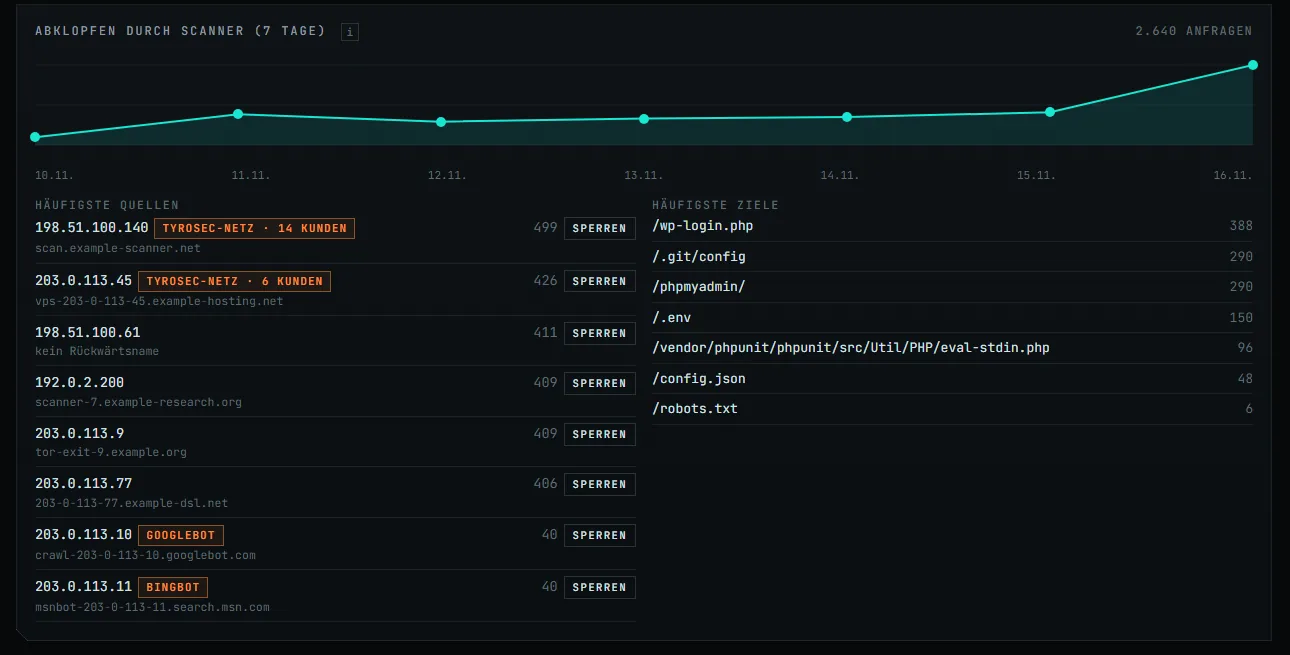
Every website is constantly probed – the real attack gets lost.
Around the clock, automated scanners request paths like /.env, /wp-config.php.bak or /.git/config. Most requests come up empty, but they flood the logs, burying the one successful attack.
When an attack succeeds, a small PHP file typically lands in the uploads folder – a webshell the attacker uses to run commands. Or JavaScript in the checkout that harvests credit cards. Signature scanners often find such files days later, if at all.
Look at the file and the request together.
tyrosec reads the Apache and nginx access logs and knows the webroots and domains from the web server configuration. A newly written PHP file that is requested from outside shortly afterwards is a clear signal – no matter how well the code is obfuscated.
tyrosec filters out the background noise: requests for non-existent files end up in probe statistics instead of alerts. Whether a “sensitive file” was really served is verified on disk – many applications answer every path with their home page. Search engines and AI crawlers are reliably identified via reverse DNS. For WordPress sites in detail: WordPress security on the server.
What tyrosec detects on the web
- Webshells on writeEvery new or modified file in the webroot is immediately checked for typical malicious code patterns – in containers, too.
- New PHP file requested from the webThe most reliable webshell detection: file created by the web server, then accessed from outside.
- POST to PHP in the uploads folderUpload directories contain images, not programs. A POST to a PHP file there is almost always an attack.
- PHP in any app's media foldertyrosec knows the media and upload folders of every detected application, such as
wp-content/uploads,pub/media(Magento),storage/app/public(Laravel) orfileadmin(TYPO3). New PHP there is reported with high severity. - Skimmers in the checkoutChanges to payment files without a deploy window are reported with high severity.
- Sensitive files served
.env,.git, backups,phpinfo– only reported if the file actually exists and was served. - Sensitive files checked from outsideOnce a day, the central service requests paths such as
/.env,/.git/config,/app/etc/env.phpor/wp-config.php.bakfor each website. It only alerts if the response really looks like that file – home pages that answer every path trigger nothing. The content is never stored. - Web server runs commandsIf PHP or nginx spawns a shell,
curl | shor a network tool, that’s a critical alert.
Scanner statistics instead of alert floods
Who knocks on which door, and how often? The probe statistics show requests per hour as a line chart along with the top sources and targets, and reliably identify known crawlers such as Googlebot, Bingbot, DuckDuckBot, GPTBot or AhrefsBot via reverse and forward DNS. With the Pro plan, you block suspicious scanners with one click. The trial run already shows what an automatic block would have achieved – automatic execution is being released step by step.
Malware rules (YARA) on write
- Every new or changed fileThe agent checks files right when they are written, using a pack of YARA rules – the widely used detection patterns for malware. That includes known webshells and skimmers whose code is well obfuscated.
- Carefully selectedWe only take rules from recognised sources whose licence permits this use – rules without a clear licence stay out.
- Signed and versionedtyrosec delivers the rule pack signed; the agent only accepts packs with a valid signature, and the interface shows which version is active.
- Hits with evidenceThe alert names the matching rule and its severity. With the Pro plan, you move the finding to quarantine with one click.
Decoys: traps only attackers set off
- Decoy file with fake credentialsOn request, tyrosec places a realistic-looking file in the webroot – such as a
.envor a note with credentials for SSH, database or website admin. All values are made up and valid nowhere. - Secret addressA supposed admin login of your website at a secret address. No visitor and no search engine knows it – every request to it is reported.
- Even reading it stands outtyrosec reports opening the file (with process), a login attempt with the decoy data and any request to the secret address. Whoever touches a decoy is deliberately hunting for credentials – an almost certain sign of an intruder. Backup programs and virus scanners only show up as a notice.
- Placed safelyThe agent only places decoys after a one-time approval on the server, never over existing files and never with executable extensions. One decoy per server is included in every plan, more with the Pro plan.
Web attacks FAQ
Which web servers are supported?
Apache and nginx, including common hosting panels such as Plesk. tyrosec reads webroots and domains from the configuration and access logs from the usual paths.
Do I need a WordPress plugin?
No. tyrosec works at the server level and detects attacks on any PHP or Node application. On top, the agent recognizes WordPress, WooCommerce, Magento, Shopware, PrestaShop, JTL-Shop, Laravel, Symfony, TYPO3, Contao, Joomla, Drupal, Nextcloud, Next.js and Nuxt with version, plugins, media and cache folders – and checks their hardening.
Does tyrosec replace a web application firewall?
tyrosec detects on the server, a WAF filters requests in front of it – the two complement each other. With tyrosec Pro you block suspicious sources in the server firewall with one click. Automatic blocks start as a trial run: you see whom tyrosec would have blocked and why, before you later switch on automation per server.
More features
See what’s happening on your server in two minutes.
Install the agent with a one-liner, wait for the initial scan, done. 14 days free, up to 3 servers, no credit card required.