Clean up in minutes instead of days.
After a break-in, the real work begins: checking hundreds of files, removing malicious code, finding backdoors. tyrosec knows the clean state of every file – and brings the website back to it.
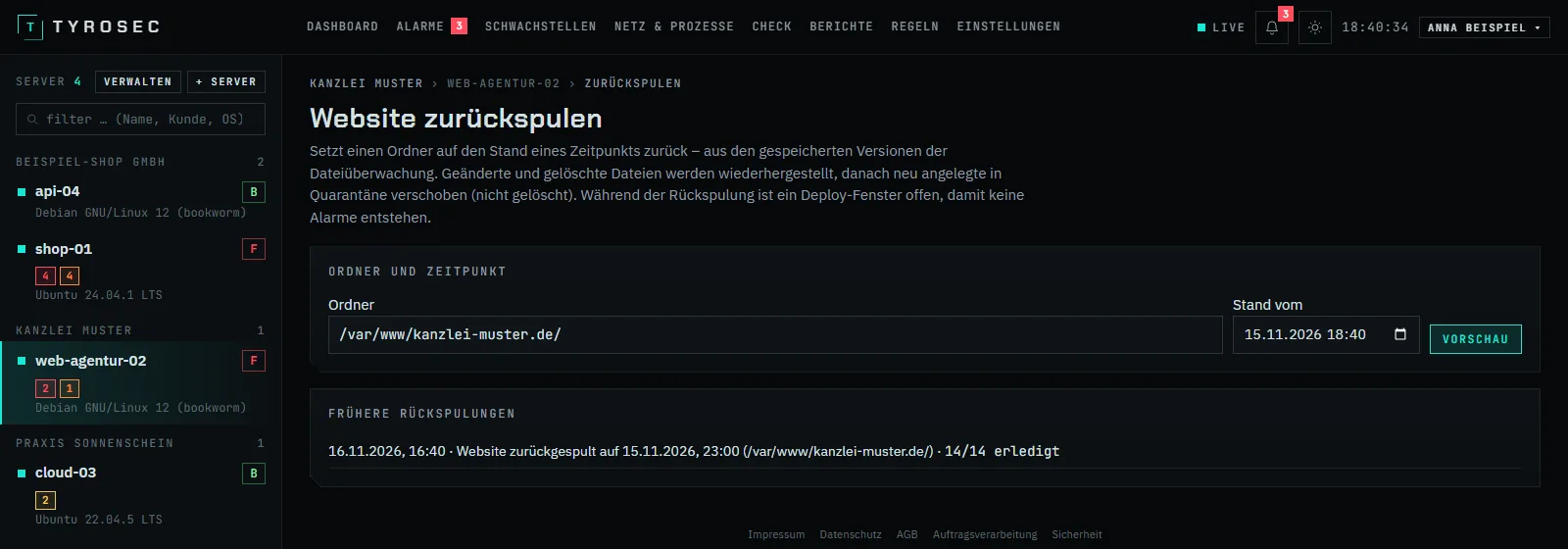
An infection rarely sits in just one file.
Typical malware appends eval(base64_decode(…)) to dozens of PHP files, drops additional webshells into subfolders and modifies .htaccess for redirects. Delete only the obvious file, and you’ll have the same infection the next day.
Restoring a full backup sounds simple – but it costs all content and orders since the backup, and often nobody knows when the infection began.
Know the clean state of every file.
Because tyrosec stores every change with a version, there’s a known good state for every file. Malware cleanup uses it first: if there was a clean version before the infection, it is restored. Otherwise, the cleaner removes known injection patterns precisely – and refuses to clean if anything suspicious would remain afterwards.
Website rollback resets an entire folder to a point in time: changed files get their old state back, files created since then move to quarantine, deleted files are restored. Beforehand, you see a complete preview – file by file.
How a cleanup works
- 01Detecttyrosec reports malicious code on write or during a check – with file, pattern and timestamp.
- 02PreviewYou see exactly which lines will be removed or which files will be reset.
- 03ConfirmOne click – the agent executes the action and reports the result per file.
- 04Follow-up checkAfterwards, tyrosec checks again. Suspicious leftovers are never silently ignored.
Cleanup FAQ
What if there’s no clean version?
Then the cleaner tries to remove known injection patterns precisely. If a suspicious pattern remains afterwards, nothing is cleaned – you then make a deliberate decision between quarantine and manual work.
Is content lost during a rollback?
Only files in the selected folder are reset, not the database. New files are not deleted but moved to quarantine, from where they can be restored. Media, upload and cache folders of detected applications – such as wp-content/uploads or pub/media – are always left out of a rewind; uploaded images and documents are kept.
More features
See what’s happening on your server in two minutes.
Install the agent with a one-liner, wait for the initial scan, done. 14 days free, up to 3 servers, no credit card required.