What needs doing? One list instead of a hundred alerts.
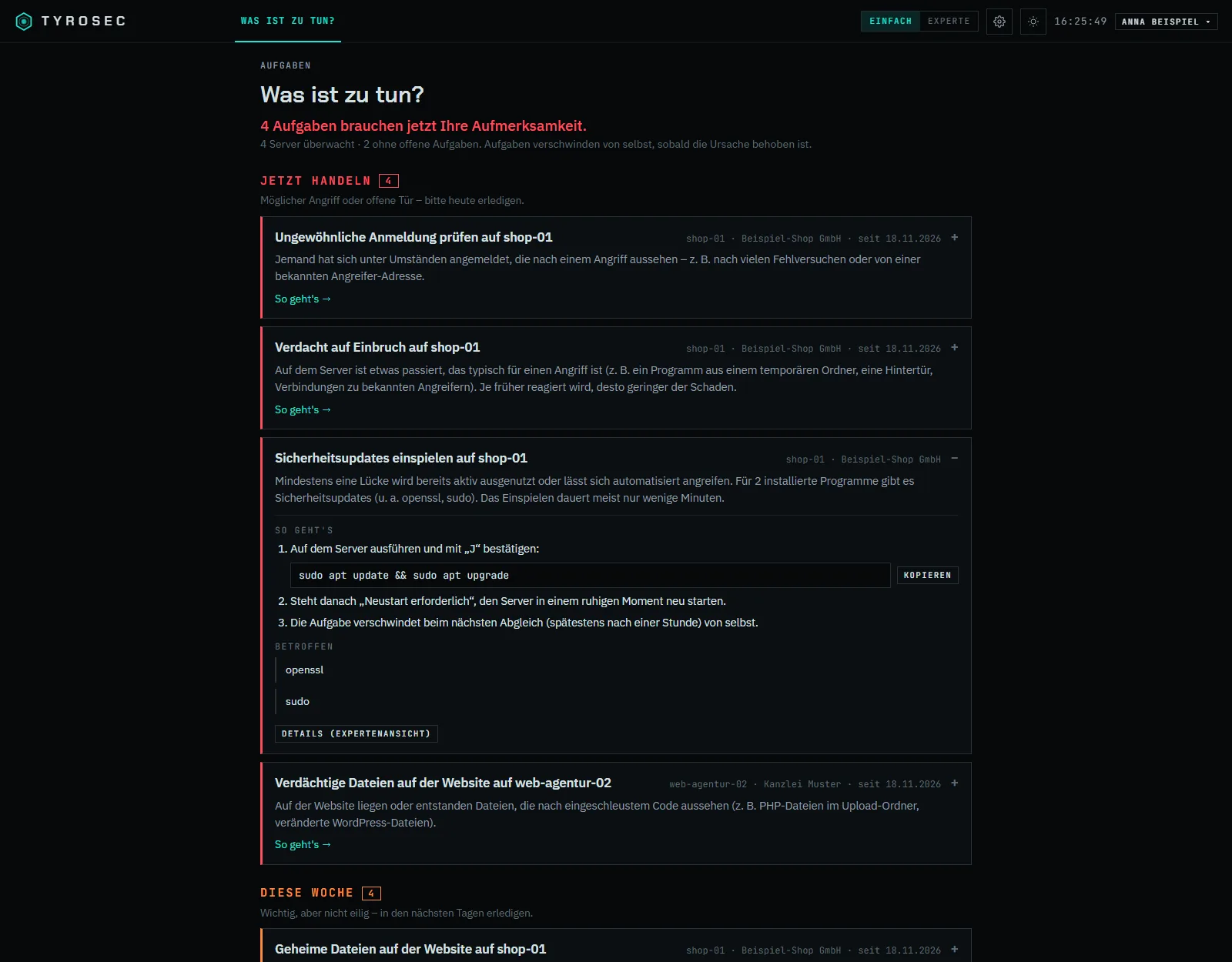
Not everyone who runs a server is a sysadmin. tyrosec condenses everything it notices on your servers into a few clear tasks – with an explanation, instructions and the right command. Once the cause is fixed, the task disappears on its own.
73 open alerts. Now what?
Security tools speak the language of admins: CVE numbers, process chains, event logs. If you run a website, a shop or a small server, you mostly see one thing – a lot of red – and no idea where to start.
The result: important things get missed because they drown in unimportant ones.
Three stacks: now, this week, all good.
tyrosec turns alerts into tasks: 59 vulnerabilities become “Install security updates”, an open database port becomes “Database reachable from the internet – here is how to close it”.
Act now shows only what is urgent. This week collects updates, reboots and settings. All good shows what was checked and found clean – so you know your server is healthy, not only when something is wrong.
How it works
- 01DetectThe agent reports files, processes, logins, packages and services; the central service checks from outside and matches known vulnerabilities.
- 02CondenseRelated findings become one task in plain language – with the why and the urgency.
- 03FixStep-by-step instructions with commands to copy, matching your system (apt, dnf, zypper, apk; ufw or firewalld).
- 04ForgetOnce the update is installed or the port is closed, the task disappears at the next check – no click needed.
Made for people who have no time for log files
- Ready-made commandsWith real names instead of placeholders – and a safety net: SSH changes are validated before they are applied.
- Origin in plain words“Belongs to the Elasticsearch service, harmless” instead of a cryptic path.
- Emergency pathIf a break-in is suspected: delete nothing, secure your access, bring in experts – with all the evidence for your admin.
- Simple or expertOne switch per user. Admins keep alerts, events and diffs; clients and beginners see just the tasks.
- For agenciesGive your clients the simple view – and work in the expert view yourself, on the same data.
- Nothing gets lostEvery serious finding ends up in a task. Notices that need no action stay out of the way.
Questions about the action list
Do I need Linux skills?
Basic skills are enough: you should be able to log in via SSH and paste a command. Where a task needs experience (e.g. an operating system upgrade), tyrosec says so openly and recommends involving your admin or hosting provider.
Do I have to mark tasks as done?
Usually not. tyrosec checks updates, reboots, firewall and open ports itself – the task disappears as soon as the cause is fixed. Only findings that need a judgement (e.g. an unusual login) are ticked off after review.
Is the action list available in the expert view too?
Yes. Admins find the same list under “Tasks” – as a quick overview of all servers.
More features
See what’s happening on your server in two minutes.
Install the agent with a one-liner, wait for the initial scan, done. 14 days free, up to 3 servers, no credit card required.