What’s actually running – and who is it talking to?
An intrusion reveals itself at the latest when foreign code runs: as a reverse shell, a miner, a spam cannon. tyrosec continuously watches new processes and connections and knows the difference between your web server and an attacker.
Malware disguises itself as a normal process.
Crypto miners call themselves kworker or systemd-helper, backdoors run from /tmp or from an already deleted file, a webshell opens a connection back to the attacker. Nobody notices in top – until the power bill arrives or the IP ends up on spam blocklists.
Traditional monitoring measures load and memory, but doesn’t tell you which program is connecting where, and why.
Assess process, origin and destination together.
tyrosec checks every newly started process and, every few seconds, all existing connections. The assessment is contextual: Where does the program live? Who started it? Where is it connecting? A shell whose input and output are attached to an internet connection is a reverse shell – no matter what it’s called.
tyrosec learns what’s legitimate: new outbound connections from the web server are reported once and then remembered as normal; mail retrieval and DNS are harmless from the start. A shared check recognizes package managers and mounted AppImages, so updates don’t trigger alerts.
What tyrosec detects
- Reverse shellsShells and scripting languages whose input/output is an outbound TCP connection – even if they were started before the agent.
- Crypto minersKnown miners, the Stratum protocol and outbound connections to mining pool ports.
- Spam sendingDirect delivery to external mail servers (port 25) by programs that aren’t mail servers.
- Programs from /tmp or deletedExecution from temporary or hidden folders and from files deleted after startup.
- Web server with new destinationsPHP or Node connects to a new destination for the first time – reported once, then learned.
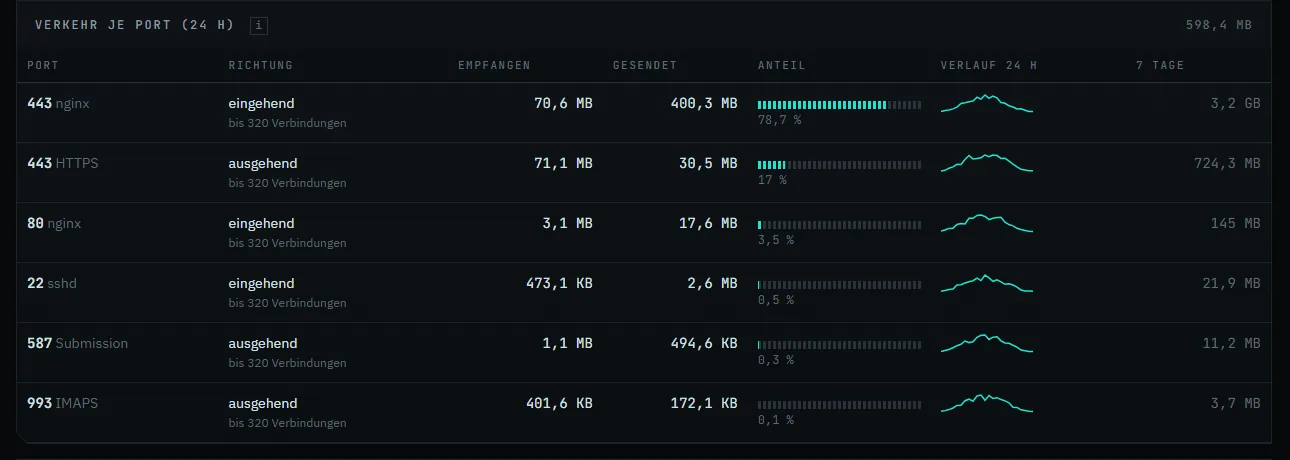
- Traffic per portHow much traffic runs through which service? Unusual volumes stand out against learned baselines.
CPU history per program
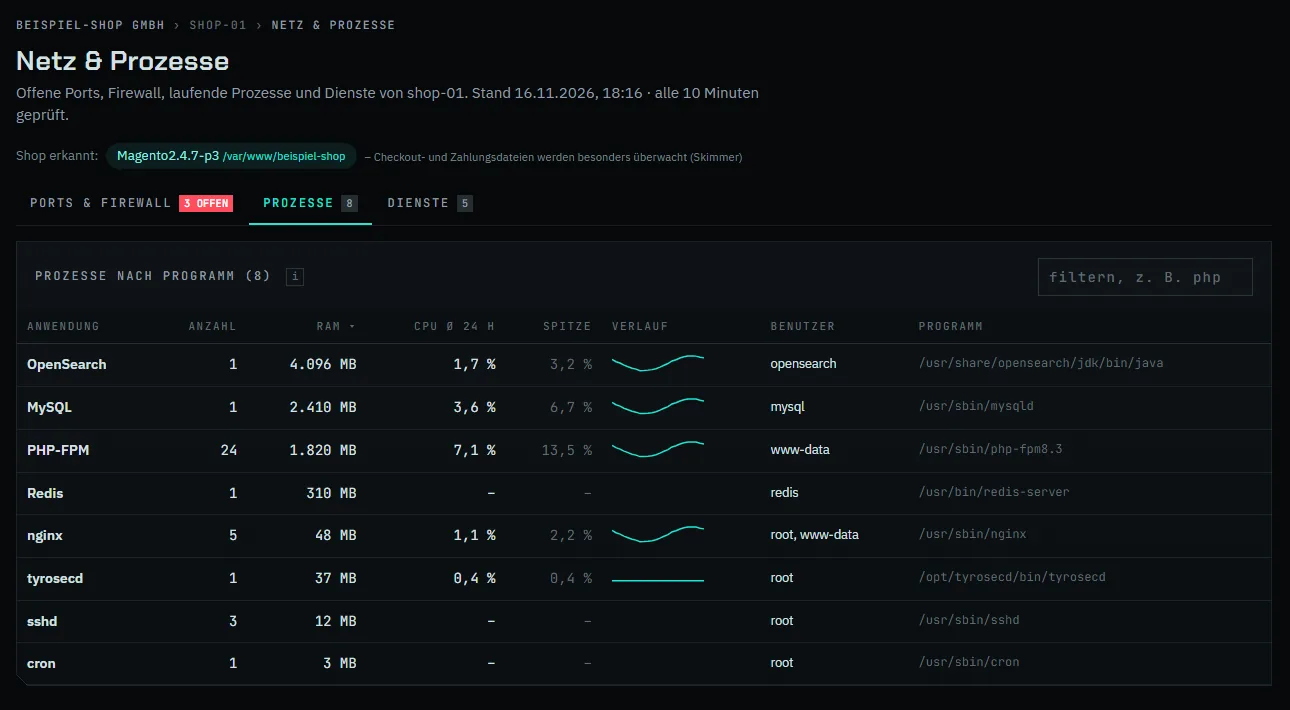
The process view shows the average CPU, peak and history of the last 24 hours for every program – sortable. So you can see at a glance whether a process suddenly causes sustained load, and spot miners even when they throttle themselves.
Regular outbound contacts (beaconing)
- The rhythm gives it awayMalware often checks in with its command server at fixed intervals – every five minutes, every hour. tyrosec analyses each program's connections over 24 hours and finds such regular patterns, even if individual contacts are missing.
- With name and networkFor each destination, tyrosec shows the domain name from the server's DNS answers and the network the address belongs to – instead of a bare IP.
- Known traffic stays quietYour own servers, the tyrosec central service, verified crawlers and approved mail relays don't count. Monitoring, updates or an API you know are marked as “intended” once. Update servers of the detected applications – such as api.wordpress.org, repo.magento.com, packagist.org or apps.nextcloud.com – count as expected.
- Observe first, alert laterFindings are listed for the server with interval, number of contacts and last contact – and on the page of the respective IP. Like every new detection, beaconing first runs silently; alerts follow once the hit rate is right.
Processes and network FAQ
Does tyrosec need eBPF or kernel modules?
No. The agent uses standard Linux kernel interfaces and also runs on older kernels and in virtual machines without special privileges for modules.
What about legitimate programs in /tmp?
tyrosec recognizes mounted AppImages (e.g. Collabora in Nextcloud) and package manager programs as harmless – not by name, but by the actual mount point or process chain.
More features
See what’s happening on your server in two minutes.
Install the agent with a one-liner, wait for the initial scan, done. 14 days free, up to 3 servers, no credit card required.