Is the server already compromised?
Real-time monitoring protects you from today on. The compromise check answers the question every new client asks: Is there already something on this server that doesn’t belong there? Like rkhunter, chkrootkit or Linux Malware Detect (maldet), it searches for rootkits and malicious code – and also verifies every system binary against the package sources.
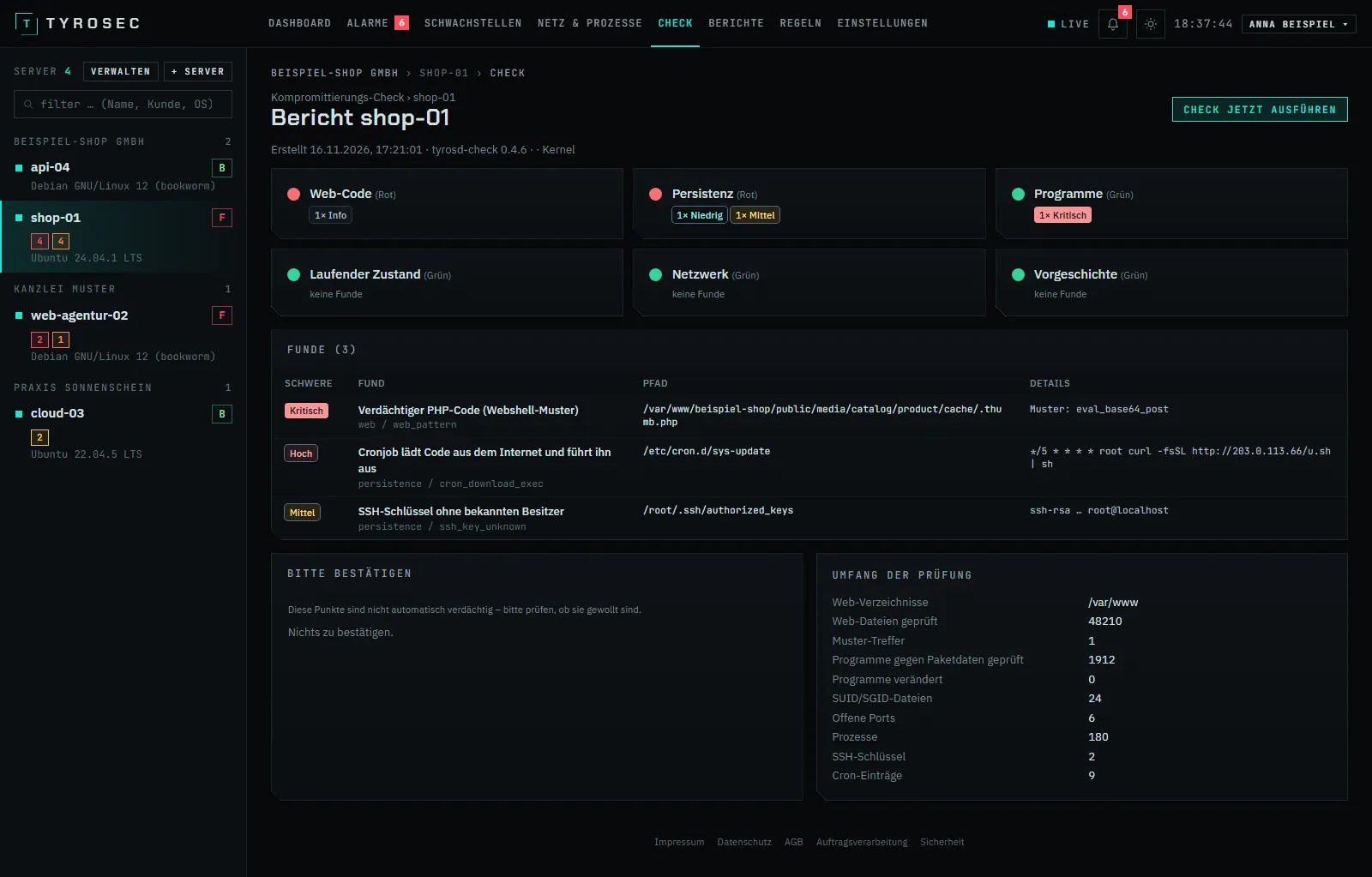
Take over a server, and you take over its old break-ins.
Agencies and hosting providers constantly take over servers whose history they don’t know. A backdoor from a year ago – an extra root user, a tampered sshd, a cron job that reloads code every ten minutes – goes unnoticed by real-time monitoring because nothing changes anymore.
Rootkit scanners exist, but they are old, noisy and their output is hard to interpret.
A thorough check with a clear report.
During setup and regularly afterwards – or at the push of a button – the agent systematically checks the server: binaries against the package database and official hashes, SUID programs and capabilities without a package, processes running from memory or temporary folders, persistence in cron, systemd, SSH keys and sudo, open ports with firewall assessment.
Every finding comes with evidence and context. Package-owned cron jobs appear only in the report, not as alerts; service-owned libraries in temporary folders are recognized. What remains deserves your attention.
What the check covers
- Rootkit indicators
ld.so.preload, processes frommemfd, hidden folders, replaced system binaries and libraries. - Rogue root privilegesSUID/SGID programs and capabilities not owned by any package – in containers, too, checked against their own package database.
- PersistenceUsers with UID 0, system users with a shell, sudo rules, SSH keys, cron jobs and systemd services – described in plain language.
- RuntimeProcesses and open ports of programs from temporary folders, services not restarted after updates.
- Publicly exposed servicesDatabases, Redis, the Docker API and similar services that don’t belong on the internet.
- Package integrityBinaries and libraries checked against package manager checksums and official sources.
- Hardening per applicationDebug or developer mode in production (e.g.
APP_DEBUG=truein Laravel, Magento in developer mode,WP_DEBUG_DISPLAY), installation tools left open such as the TYPO3 Install Tool or Joomla'sinstallation/folder, and configuration files writable by every user. - Composer autoloader and vendor/Autoloader entries that belong to no installed package or don't look generated by Composer (
eval,base64, includes from/tmp), and files undervendor/changed after installation. - Malware rulesIn addition to the check, the agent continuously scans every new or changed file in web folders and temporary directories for known malware with tyrosec’s signed YARA rule pack.
Comparison with the official packages
- Independent of the local package databaseBesides the program itself, a rootkit can also forge the checksums in the local package database. tyrosec therefore compares system programs against checksums from the distribution's officially signed package lists – swapped programs are still caught.
- Debian, Ubuntu and the RHEL familyFor every installed package version, the tyrosec central service fetches the reference from the distribution's sources, and older versions from its archives.
- Open about the limitsIf a version can no longer be verified publicly – such as packages from Ubuntu Pro (ESM) or third-party sources – tyrosec says so openly instead of raising an alarm.
- Composer packages and WordPress themesThe check delivers checksums of all Composer packages and WordPress themes – on changes, e.g. to
composer.lock, and weekly otherwise. The central service compares them with the originals from Packagist or WordPress.org and reports modified and foreign files.
Compromise check FAQ
How often does the check run?
At installation, then regularly in the background, and at any time at the push of a button from the interface.
What happens to the findings?
Critical and high findings become alerts; everything else goes into the report. Known, intended findings can be marked as resolved or as an exception.
More features
See what’s happening on your server in two minutes.
Install the agent with a one-liner, wait for the initial scan, done. 14 days free, up to 3 servers, no credit card required.