First see what would have happened. Then act.
With tyrosec Pro you restore the clean file, move the webshell to quarantine or block the attacker – right from the alert. For every automatic measure, the trial run first shows what tyrosec would have done: with reason, source and whether it would have been a mistake.
Automation without trust is a risk.
Anyone who discovers a break-in has to log in, find the file, dig up a clean version and add the attacker's IP to the firewall – under time pressure and often at night. Automatic response sounds tempting, but a wrong block hits real customers, and a wrongly killed process takes the shop down.
And a back channel where the central service controls the servers is a risk in itself: whoever takes over the central service must not automatically take over every server.
One click today – automatic only once the numbers are right.
From every matching alert, tyrosec offers the countermeasure: restore the file from the stored previous version, move a webshell to quarantine (permissions removed, content kept), block an IP in the server firewall or roll back the website. The agent only runs actions from a fixed list, never arbitrary commands – and only types you have enabled on the server itself (tyrosecd actions enable).
Everything tyrosec could do automatically first runs as a trial run: tyrosec records what it would have blocked, quarantined or stopped, and checks whether that would have been right – for example whether a “blocked” IP later logged in legitimately. Automatic execution is being released step by step; until then, every measure runs as a trial run. After that, you enable it per server and per measure as soon as you trust the results.
The trial run: see what tyrosec would have done
- Would have blocked, would have movedEvery reaction of the trial run is shown in the interface with reason, source and time – across all servers and for each individual IP.
- Mistakes are countedIf a block would have hit someone legitimate – your own servers, verified search engines, a later successful login, a false alarm – tyrosec counts it as a mistake. So you see the hit rate before anything goes live.
- Impact in numbersHow many attacks would have been stopped? The trial run shows it per server and per source: own detection, all your own servers, public blocklists such as blocklist.de or the DROP list, and the tyrosec network.
- Shared threat listIf an IP stands out at several different tyrosec customers, it goes onto the shared list – a single source cannot poison it, and other customers stay anonymous.
Measures per server: you decide what tyrosec may do
- 21 measures in four groupsNetwork (block attackers, stop spam sending and connections to command servers), files (quarantine webshells and malicious code), processes (pause or stop suspicious processes, prevent starts from /tmp) and access & autostart.
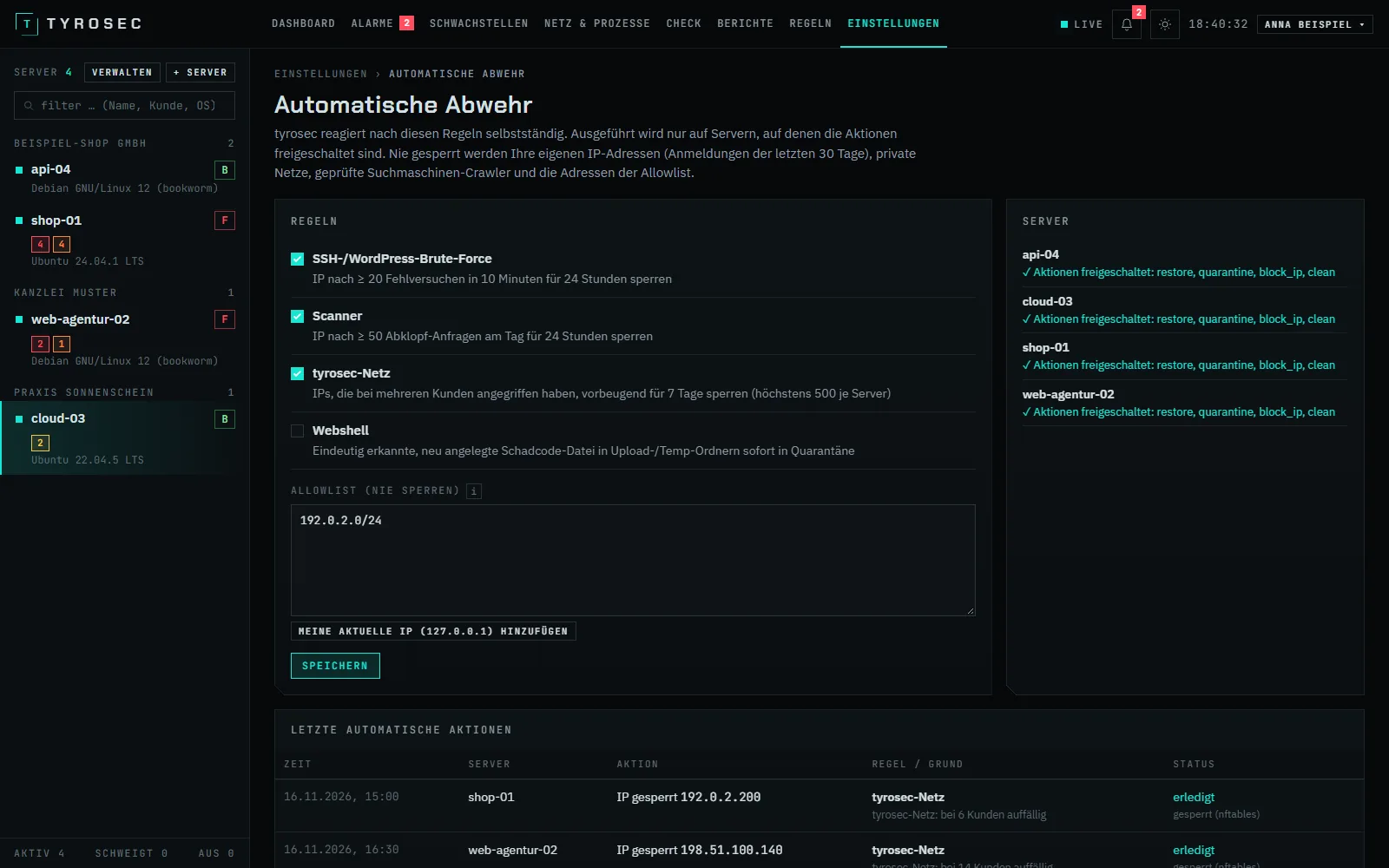
- Off, Suggest, AutomaticFor each measure you choose: just report, suggest it under “Tasks” and trigger it with one click – or later run it automatically. Next to it are the trial-run figures of the last 30 days for exactly this server.
- Explained, with riskFor every measure: what it does, when it applies, what can go wrong and how to undo it. You set thresholds and block durations yourself.
- Far-reaching actions only by handRestoring a file, rolling back a website, disabling an SSH key, locking a user and switching off autostart entries are always triggered by you – never by automation.
- Template for all serversApply one server's settings to all servers with one click – including servers you add in future. Every change is logged with person and time.
- Three approvalsA measure only takes effect if you configure it, its type is enabled on the server and tyrosec has released it after a reliable trial run across all servers. Without the approval on the server, the agent cannot change anything – not even if someone takes over your account.
- Never against your ownYour servers, your own IP, your team's IPs, verified search engines and addresses on the allowlist are never blocked; blocks expire on their own after the set time.
- Undo instantlyLift blocks and quarantine with one click; files are kept safe in quarantine.
Response FAQ
Does tyrosec already block automatically?
No – deliberately not. Today tyrosec acts when you click. Everything that could happen automatically runs as a trial run and is evaluated. We release automatic execution step by step, measure by measure, once it has proven reliable in the trial run across all servers. After that, you decide per server whether to switch it on.
Can the tyrosec cloud run arbitrary commands on my server?
No. The agent only knows a fixed list of actions and only executes those you have enabled locally on the server. Arbitrary commands are technically impossible.
What is used for blocking?
The server’s firewall (nftables or iptables). Blocks are time-limited and lifted by the agent itself.
Which actions already work with one click?
Restore a file, move it to quarantine, remove malicious code, roll back a website and block an IP – on servers where you have enabled that type of action. Included in the Pro and Agency plans.
More features
See what’s happening on your server in two minutes.
Install the agent with a one-liner, wait for the initial scan, done. 14 days free, up to 3 servers, no credit card required.